
Reset a Cisco 2960 Switch To Factory Default Settings
Step 1
Connect up a console cable and power on the switch, whilst holding down the “mode” button:
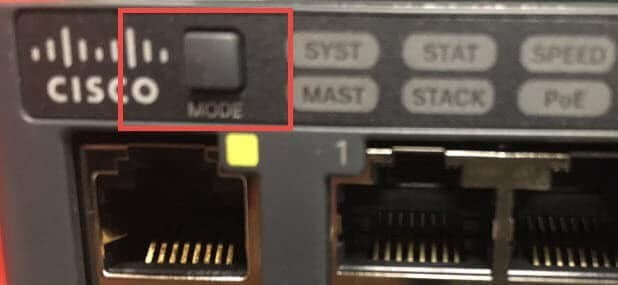
This interrupts the boot process before the Flash file system can initialize, and after a short while you will see the following prompt:
Step 2
Run the following command to initialize the flash file system:
Switch:flash_init
switch: flash_init
Initializing Flash…
mifs[2]: 10 files, 1 directories
mifs[2]: Total bytes : 1806336
mifs[2]: Bytes used : 612352
mifs[2]: Bytes available : 1193984
mifs[2]: mifs fsck took 1 seconds.
mifs[3]: 0 files, 1 directories
mifs[3]: Total bytes : 3870720
mifs[3]: Bytes used : 1024
mifs[3]: Bytes available : 3869696
mifs[3]: mifs fsck took 0 seconds.
mifs[4]: 5 files, 1 directories
mifs[4]: Total bytes : 258048
mifs[4]: Bytes used : 9216
mifs[4]: Bytes available : 248832
mifs[4]: mifs fsck took 0 seconds.
mifs[5]: 5 files, 1 directories
mifs[5]: Total bytes : 258048
mifs[5]: Bytes used : 9216
mifs[5]: Bytes available : 248832
mifs[5]: mifs fsck took 1 seconds.
— MORE —
mifs[6]: 566 files, 19 directories
mifs[6]: Total bytes : 57931776
mifs[6]: Bytes used : 28429312
mifs[6]: Bytes available : 29502464
mifs[6]
switch: flash_init
Initializing Flash…
mifs[2]: 10 files, 1 directories
mifs[2]: Total bytes : 1806336
mifs[2]: Bytes used : 612352
mifs[2]: Bytes available : 1193984
mifs[2]: mifs fsck took 1 seconds.
mifs[3]: 0 files, 1 directories
mifs[3]: Total bytes : 3870720
mifs[3]: Bytes used : 1024
mifs[3]: Bytes available : 3869696
mifs[3]: mifs fsck took 0 seconds.
mifs[4]: 5 files, 1 directories
mifs[4]: Total bytes : 258048
mifs[4]: Bytes used : 9216
mifs[4]: Bytes available : 248832
mifs[4]: mifs fsck took 0 seconds.
mifs[5]: 5 files, 1 directories
mifs[5]: Total bytes : 258048
mifs[5]: Bytes used : 9216
mifs[5]: Bytes available : 248832
mifs[5]: mifs fsck took 1 seconds.
— MORE —
mifs[6]: 566 files, 19 directories
mifs[6]: Total bytes : 57931776
mifs[6]: Bytes used : 28429312
mifs[6]: Bytes available : 29502464
mifs[6]
switch: flash_init
Initializing Flash…
mifs[2]: 10 files, 1 directories
mifs[2]: Total bytes : 1806336
mifs[2]: Bytes used : 612352
mifs[2]: Bytes available : 1193984
mifs[2]: mifs fsck took 1 seconds.
mifs[3]: 0 files, 1 directories
mifs[3]: Total bytes : 3870720
mifs[3]: Bytes used : 1024
mifs[3]: Bytes available : 3869696
mifs[3]: mifs fsck took 0 seconds.
mifs[4]: 5 files, 1 directories
mifs[4]: Total bytes : 258048
mifs[4]: Bytes used : 9216
mifs[4]: Bytes available : 248832
mifs[4]: mifs fsck took 0 seconds.
mifs[5]: 5 files, 1 directories
mifs[5]: Total bytes : 258048
mifs[5]: Bytes used : 9216
mifs[5]: Bytes available : 248832
mifs[5]: mifs fsck took 1 seconds.
— MORE —
mifs[6]: 566 files, 19 directories
mifs[6]: Total bytes : 57931776
mifs[6]: Bytes used : 28429312
mifs[6]: Bytes available : 29502464
mifs[6]
Step 3
Delete the config.text file from the flash directory:
switch: del flash:config.text
Are you sure you want to delete “flash:config.text” (y/n)?y
File “flash:config.text” deleted
And Finally, Delete the vlan.dat file from the flash directory and reboot the system
switch: del flash:vlan.dat
Are you sure you want to delete “vlan.dat” (y/n)?y
File “flash:vlan.dat” deleted
To reboot the system:
switch: boot
Loading "flash:c2960s-universalk9-mz.122-58.SE2.bin"…
— System Configuration Dialog —
Enable secret warning
———————————-
In order to access the device manager, an enable secret is required
If you enter the initial configuration dialog, you will be prompted for the enable secret
If you choose not to enter the intial configuration dialog, or if you exit setup without setting the enable secret,
please set an enable secret using the following CLI in configuration mode-
enable secret 0 <cleartext password>
———————————-
Would you like to enter the initial configuration dialog? [yes/no]
switch: boot
Loading "flash:c2960s-universalk9-mz.122-58.SE2.bin"…
— System Configuration Dialog —
Enable secret warning
———————————-
In order to access the device manager, an enable secret is required
If you enter the initial configuration dialog, you will be prompted for the enable secret
If you choose not to enter the intial configuration dialog, or if you exit setup without setting the enable secret,
please set an enable secret using the following CLI in configuration mode-
enable secret 0 <cleartext password>
———————————-
Would you like to enter the initial configuration dialog? [yes/no]
switch: boot
Loading "flash:c2960s-universalk9-mz.122-58.SE2.bin"…
— System Configuration Dialog —
Enable secret warning
———————————-
In order to access the device manager, an enable secret is required
If you enter the initial configuration dialog, you will be prompted for the enable secret
If you choose not to enter the intial configuration dialog, or if you exit setup without setting the enable secret,
please set an enable secret using the following CLI in configuration mode-
enable secret 0 <cleartext password>
———————————-
Would you like to enter the initial configuration dialog? [yes/no]
Ready for a more resilient infrastructure?
Stop settling for slow support and generic security. Get a free, no-obligation Security & Cloud Audit from our Manchester-based engineers.
Ready for a more resilient infrastructure?
Stop settling for slow support and generic security. Get a free, no-obligation Security & Cloud Audit from our Manchester-based engineers.
Ready for a more resilient infrastructure?
Stop settling for slow support and generic security. Get a free, no-obligation Security & Cloud Audit from our Manchester-based engineers.